The Technical Process of Tour Info Scraper – C Term 2026 IQP in Hong Kong
13th March 2026
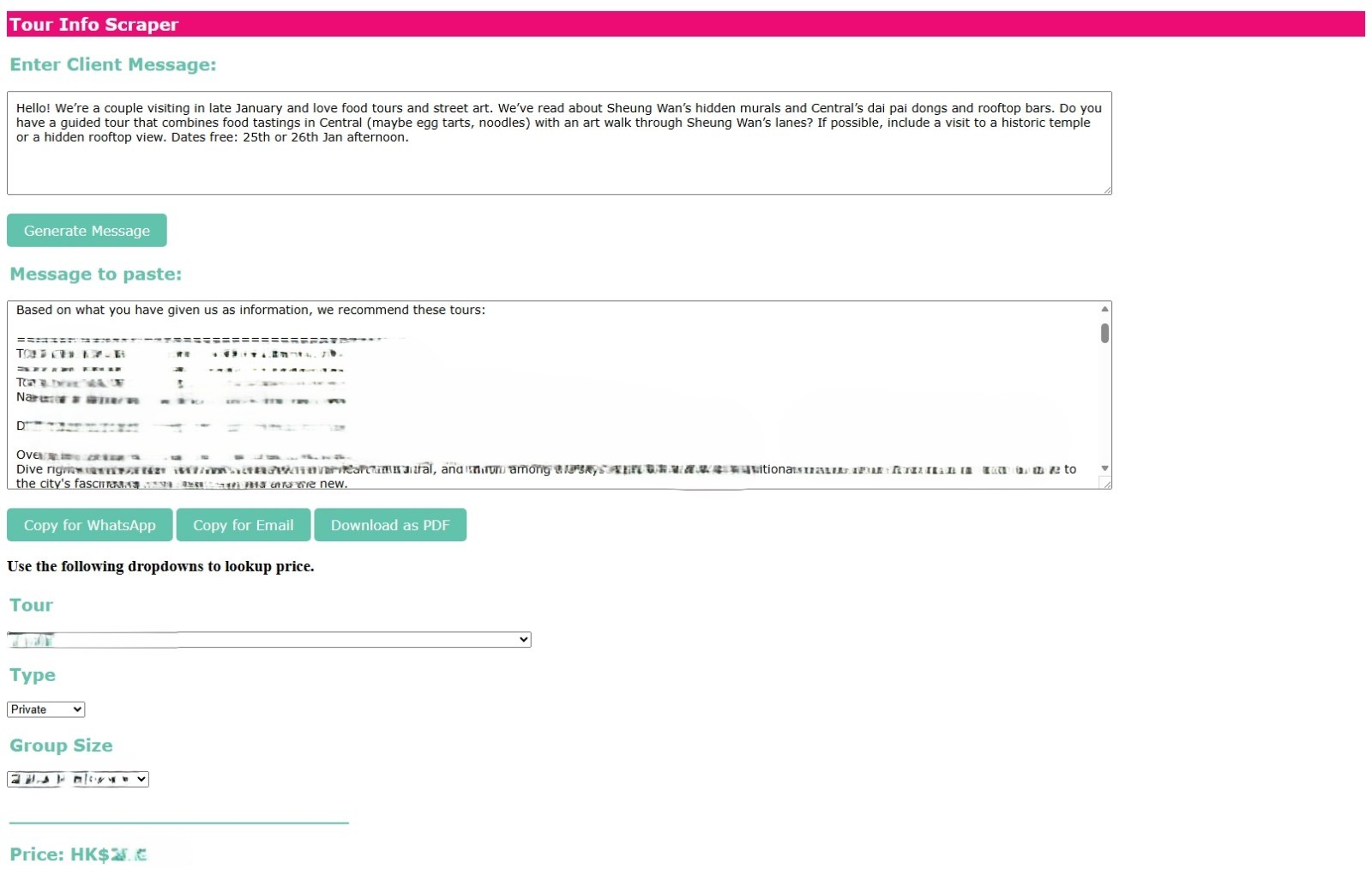
One of Walk in Hong Kong’s needs that was pointed out to us was an interface that would assist the staff team in finding a selection of appropriate tours for the client based on what they expressed in their messages. As Walk in Hong Kong is switching to WhatsApp as their primary communications line, PABC was asked to develop an interface that would:
1. Take client messages as input
2. Find fitting tours from Walk in Hong Kong’s database
3. Output a formatted text for the staff to send back to the client with ease
Basic Structure:
During the pre-development phase, teammates brainstormed ideas and worked closely with the Walk in Hong Kong team on how the system should be structured, what programming languages should be used, how and where should the data be handled, what are short-term and long-term goals. For the mid-term, it was decided that using a semi-manual system, where the staff would manually input client messages into the interface and paste the output back, would be cost and time efficient. Our sponsor expressed that they wanted to run testing with 0 to minimal cost as they were unsure of whether they would end up implementing anything.
Walk in Hong Kong’s database for tours is maintained on Google Sheets. To access these datapoints, it was necessary to use gspread, a Python API to access and modify Google Sheets. This API allows the program to access spreadsheets either by title, key, or URL to perform reading, writing, and formatting actions. Although Walk in Hong Kong initially provided access via a user account for interns, I implemented authentication using a service account from Google Cloud Platform.
I shared the relevant spreadsheets with the service account's email address and credentials, granting it editor permissions. This allows the web app to access the spreadsheets automatically without relying on individual user credentials. Unlike user accounts, service accounts do not possess, and password-based vulnerabilities and their accesses can be controlled via Identity and Access Management Roles (IAM) on the administrator developer dashboard. This is why; they tend to be the more secure solution for production applications. With private credentials, the service account grants the back end of our web app easy access to all API calls.
While looking into typical solutions, libraries, and packages that could be used, I decided to also prioritize the safety of Walk in Hong Kong’s tour data and information, due to sector competitiveness. Therefore, it was decided not to outsource LLM APIs (Large Language Model Application Programming Interfaces) and instead develop our own basic language processing algorithm that could be customized based on Walk in Hong Kong’s needs and data.
I chose to use libraries such as spacy, sklearn, and rapidFuzz to implement a TF-IDF algorithm while also accounting for typos. Through what I could remember from my CS classes, the TF-IDF algorithm helped us filter out context specific words rather than stop words (meaning they carry very little semantic meaning). While the term size is not too many in the case of a client inquiry, it was still able to extract words such as street names, activity types, areas just enough to make relevant matches. I focused entirely on the NLP aspect as we weren’t too bothered with having the interface generate a unique message format, completely discarding NLG. As for typos, aside from rapidFuzz, cosine similarity was implemented to estimate the correctly spelled versions of hot terms.
To help with pinpointing locations in the case of clients not mentioning the exact locations in the itinerary list, I created a small experimental dictionary of common areas, locations, or abbreviations that could pop up frequently in messages (I used DeepSeek to generate samples of client inquiries to see what sort of names would pop up as we didn’t have reliable access to the company’s WhatsApp account).
While it increased accuracy to some extent, we still did notice some inconsistencies such as a message including sightseeing around Temple Street get matched with a tour that mentioned temples. It would be alright if it was not for Temple Street and its area not being a temple attraction spot, as clarified by one of the staff. Therefore, the dictionary needs to be expanded more to account for such instances. Itineraries in the dataset are provided as
Location a – location b – location c – location d - ...
For this, I had to implement a regex splitting. However, few of the cells were formatted differently- I had to also account for other symbols aside from ‘-’ as a splitting criterion.
The algorithm checks matching based on 3 columns in the data: The title, overview (or the description of the tour), and the itinerary. By cross checking the terms on all 3, we can get the top 4 recommended tours.
Lastly, I had the interface format the output as plain text, embeddable html and pdf for sharing with clients on both email and WhatsApp. Also added a price lookup portion underneath it to make all resources accessible from one spot.
As of now, it is not known if this will be implemented but our overall goal in creating this prototype was to test it out with the staff to give them concrete examples of what they could be working with and what parts of their workflow could use such assistance. While we didn’t have too many people to test it out with, we still were able to get useful insight to compile into our report, methinks.
|